
Keysight (Agilent HP) 8753E Repair Service
Product model
8753E network analyzer 30kHz-3GHzServices
Description
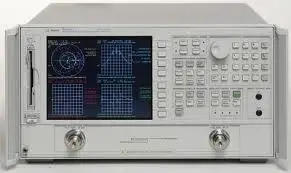
Repair prices
8753E Specifications – click to expand
8753E Specifications
| Specification | Value |
|---|---|
| Frequency Accuracy | ±10 ppm at 25 °C ± 5 °C |
| Power Range | -85 to 10 dBm; -85 to 8 dBm (Option 075) |
| Output Resolution | 0.05 dB |
| Sweep Range | 25 dB |
| Output Level Accuracy | ±1.0 dB relative to 0 dBm output level |
| Test Port Input; Frequency Range | 30 kHz to 3 GHz (std.); 30 kHz to 6 GHz (Option 006) |
| Average Noise Level 3 kHz BW | -82 dBm ( |
8753E Options – click to expand
8753E Options
Frequency Range: 30 kHz to 3 GHz (std.); 30 kHz to 6 GHz (Option 006); 300 kHz to 3 GHz (Option 011); 30 kHz to 6 GHz (Option 011, 006), Frequency Resolution: 1 Hz. Frequency Accuracy: ±10 ppm at 25 °C ± 5 °C. Power Range: -85 to 10 dBm; -85 to 8 dBm (Option 075). Output Resolution: 0.05 dB. Sweep Range: 25 dB. Output Level Accuracy: ±1.0 dB relative to 0 dBm output level. Test Port Input; Frequency Range: 30 kHz to 3 GHz (std.); 30 kHz to 6 GHz (Option 006). Average Noise Level 3 kHz BW: -82 dBm (
HP / Agilent 8753E Error Messages – click to expand
HP / Agilent 8753E Error Messages
The Agilent 8753E (30 kHz to 3 GHz (6 GHz with Option 006)) reports faults as text messages with an error number. Hardware (H) messages point to a failed assembly; user (U) messages mean a setup, calibration or cable issue; (M) messages are information.
8753E notes
- The 8753E has a built-in S-parameter test set (transfer switch, two test port couplers and R, A and B samplers).
- Option 006 extends the 8753E to 6 GHz; Option 075 changes it to 75 ohm test ports.
- Phase lock errors on the 8753E usually point to the source (YIG oscillator or source assembly) or the phase lock board, but check R channel input level first.
8753E hardware error messages
| Message | Error no. | Type | Meaning |
|---|---|---|---|
| NO PHASE LOCK: CHECK R INPUT LEVEL | 7 | H | The IF was found during pretune but the loop never locked. Check R channel level, then the source and phase lock circuits. |
| PHASE LOCK LOST | 8 | H | Phase lock was acquired and then dropped during the sweep. |
| PHASE LOCK CAL FAILED | 4 | H | The automatic phase lock calibration (run at power-on or when pretune drifts) failed. |
| POSSIBLE FALSE LOCK | 6 | H | The source may be locked to the wrong harmonic comb tooth, so frequencies can be wrong. |
| SWEEP TIME TOO FAST | 12 | H | The fractional-N and digital IF circuits lost synchronization; points to the digital control section. |
| POWER UNLEVELED | 179 | H | Source output is not leveled. Can be a power setting beyond the source range or a source/ALC fault. |
| POWER SUPPLY HOT! | 21 | H | The power supply is overheating. Check the fan, filter and air flow. |
| POWER SUPPLY SHUT DOWN! | 22 | H | One or more supplies shut down, usually from an overload or short on a board. |
| PROBE POWER SHUT DOWN! | 23 | H | The front-panel probe power supply shut down from a short or overload. |
| BATTERY FAILED. STATE MEMORY CLEARED | 183 | H | The memory backup battery has failed and stored instrument states were cleared. Replace the battery on the CPU board. |
| BATTERY LOW! STORE SAVE REGS TO DISK | 184 | H | The memory backup battery is getting weak. Save your states to disk and replace the battery. |
| CORRECTION CONSTANTS NOT STORED | 3 | H | Writing correction constants to EEPROM failed. The A9 CPU write-protect switch/jumper must be set to allow writing. |
| DEADLOCK | 111 | H | An internal firmware deadlock occurred. Cycle power; if it repeats, the CPU or a firmware problem is likely. |
| DISK HARDWARE PROBLEM | 39 | H | The disk drive is not responding properly. |
| DISK READ/WRITE ERROR | 189 | H | A disk read or write failed; try another disk, then suspect the drive. |
| DISK MESSAGE LENGTH ERROR | 190 | H | The disk drive and analyzer are out of step during a transfer. |
| INITIALIZATION FAILED | 47 | H | The disk could not be initialized; check the disk and drive. |
| NO IF FOUND: CHECK R INPUT LEVEL | 5 | H | The first IF was not detected while pretuning the phase lock. Usually a source fault, or the R channel is getting too little signal (needs at least −35 dBm). |
8753E calibration, setup and information messages
| Message | Error no. | Type | Meaning |
|---|---|---|---|
| OVERLOAD ON INPUT R, POWER REDUCED | 57 | U | Too much power at the R input; source power was reduced (P⇓). |
| CALIBRATION REQUIRED | 63 | U | No calibration set matches the current stimulus or measurement; perform a new cal. |
| CURRENT PARAMETER NOT IN CAL SET | 64 | U | The parameter you selected was not included in the active calibration. |
| CORRECTION TURNED OFF | 66 | U | Sweep type, start, span or number of points changed from the cal, so correction was switched off. |
| NO CALIBRATION CURRENTLY IN PROGRESS | 69 | U | A cal step was requested but no calibration is running. |
| NO SPACE FOR NEW CAL. CLEAR REGISTERS | 70 | U | Memory is full; clear saved registers to store a new calibration. |
| CALIBRATION ABORTED | 74 | U | The active channel was changed during a cal, so it stopped. Restart on the right channel. |
| WRONG DISK FORMAT, INITIALIZE DISK | 77 | U | The disk is not in LIF format; initialize it before use. |
| TROUBLE! CHECK SETUP AND START OVER | 115 | U | The test equipment setup for an adjustment is not correct; check the setup diagram. |
| TEST ABORTED | 113 | U | A service test or adjustment was stopped before it finished. |
| POWER METER INVALID | 116 | U | The power meter reading is out of range or not valid. |
| PWR MTR: NOT ON/CONNECTED OR WRONG ADDRS | 117 | U | The power meter is off, not connected by GPIB, or set to the wrong address. |
| POWER METER NOT SETTLED | 118 | U | Power meter readings are not stable. |
| NOT ALLOWED DURING POWER METER CAL | 198 | U | That function cannot be used while a source power meter calibration is running. |
| INSUFFICIENT MEMORY, PWR MTR CAL OFF | 154 | U | Not enough memory for power meter cal data, so it was turned off. |
| SAVE FAILED. INSUFFICIENT MEMORY | 151 | U | Not enough memory to save the state; clear some registers. |
| NOT ENOUGH SPACE ON DISK FOR STORE | 44 | U | The disk is full. |
| NO FILE(S) FOUND ON DISK | 45 | U | No files of the requested type are on the disk. |
| PARALLEL PORT NOT AVAILABLE FOR COPY | 167 | U | The parallel port is set for GPIO, so it cannot be used for printing. |
| PARALLEL PORT NOT AVAILABLE FOR GPIO | 165 | U | The parallel port is set for printing, so it cannot be used as GPIO. |
| SWEEP MODE CHANGED TO CW TIME SWEEP | 187 | M | The sweep mode was switched to CW time sweep. |
| OVERLOAD ON INPUT A, POWER REDUCED | 58 | U | Too much power at input A; the analyzer reduced source power (P⇓ annotation). Lower the power, then reset it in the power menu. |
| OVERLOAD ON INPUT B, POWER REDUCED | 59 | U | Too much power at input B; source power was reduced (P⇓). Lower the power, then reset it in the power menu. |
Hardware error on your 8753E? Analyzer Repair Inc. repairs and calibrates the HP / Agilent 8753E in-house in Cocoa, Florida, including source, phase lock, sampler and test set faults. Free estimate once the unit is in our lab. Contact us for service.
Message list based on the Agilent 8753E Service Guide (08753-90374), service error messages. Measurement-only messages are in the 8753E reference guide.